Tap Tile!
- 4.8
- Rating
- 5.00M
- Installs
- Free
- Price
 Analysis by App-foxy
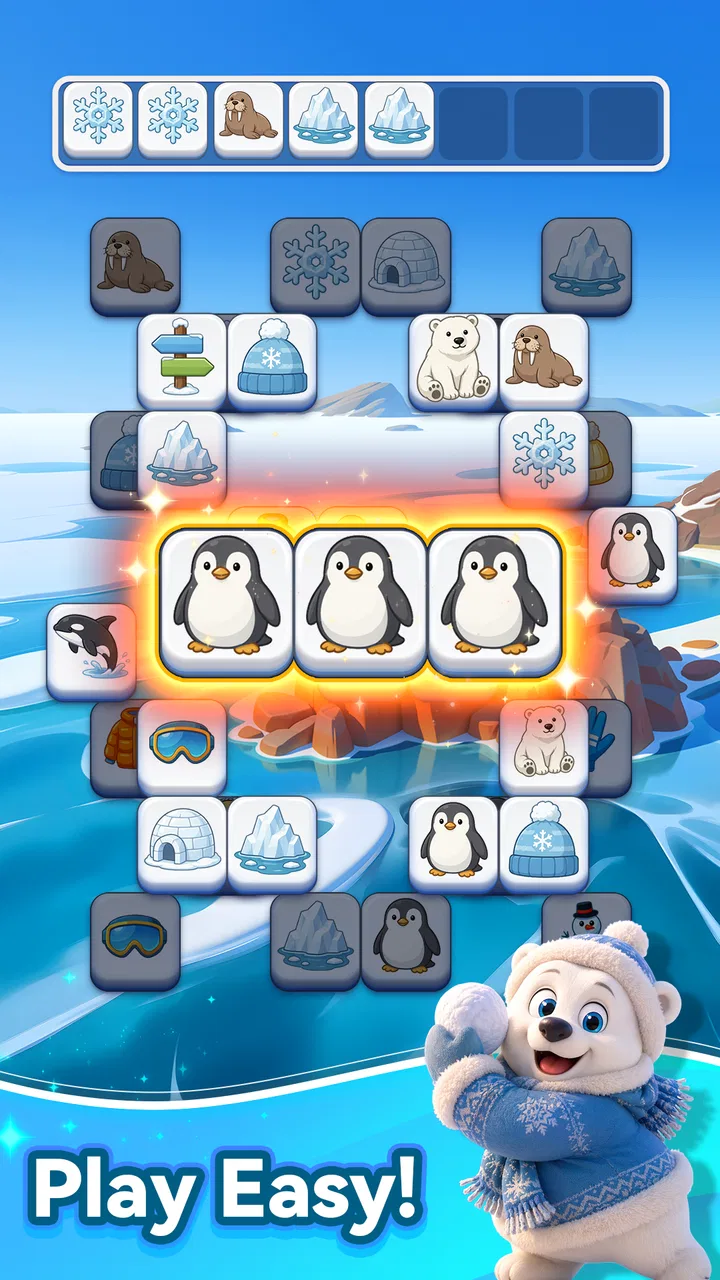
I first tried Tap Tile! as the sort of puzzle I could open for a few quiet minutes, rather than as a game demanding a long, uninterrupted session. That turned out to be the right way to approach it. It is a free puzzle game from Nebula Studio built around matching three tiles, with a simple rhythm that makes sense almost immediately. The appeal is not a complicated story or a large collection of systems; it is the small mental reset that comes from looking at a board, spotting a useful combination, and clearing space.
That simplicity also makes it interesting on a shared household device. I can imagine one person playing while waiting for dinner, another taking over later, and a child trying a few rounds when an adult is nearby. The game is marked Everyone, and its basic interaction is easy to understand. Still, I would not treat that age label as a substitute for normal supervision or a conversation about device use. The most useful question is whether the game fits the way your household shares screens, not whether it can technically be opened by everyone.
How Tap Tile! Fits Into Shared Device Time
On a phone or tablet that several people use, the strongest quality here is the low learning barrier. A player does not need a tutorial-heavy explanation before making a first move. The central action is tapping tiles and finding groups of three, so someone who has never played this particular title can understand the objective by watching for a moment. That makes it suitable for casual handoffs, especially when the device is already being used in a living room or during a short break.
You May Also Like

 Blood Strike: 2.5 Anniversary
Blood Strike’s Loadouts Turn Every Drop Into a Tactical Gamble
A close look at Blood Strike’s custom loadouts: how fast access to signature weapons reshapes its battle royale rhythm, rewards preparation, and narrows the gap between fights.

 Pandora - Music & Podcasts
Pandora’s Music Is Easy to Start, but Harder to Recover
Pandora’s strength is its low-effort path from a seed to a station. Its weak spot is how much confidence it asks you to place in connection, setup, and quiet recovery.

 8 Ball Pool
 Is Built on Rivalries, Rematches, and Routine
A close look at the rivalries, rematches, shared routines, and unanswered safety questions that turn a quick pool match into a persistent mobile community.

 Samsung Music
’s Quiet Strength Is Playing What You Already Own
Its reach comes less from spectacle than from dependable access to a personal library. That simplicity is both the app’s strongest retention engine and its ceiling.

 AccuWeather: Weather Radar
AccuWeather Review: A Quick, Clear Forecast for Everyday Decisions
For everyday plans, the best forecast is the one you can understand quickly. AccuWeather makes rain timing, radar, and local conditions easy to act on, with a few trade-offs.

 Hill Climb Racing
Why Hill Climb Racing Still Turns Crashes Into One More Run
A tiny car, a bumpy hill and one more upgrade: Hill Climb Racing keeps resurfacing because its simple chaos makes every near-miss feel personal.
More From Our News Desk



I found that the game works best when the person picking it up wants a contained activity rather than a deep commitment. A shared device often creates interruptions: someone needs the phone, a message arrives, or the tablet has to be passed to another family member. A straightforward tile puzzle handles that situation more gracefully than a story-driven game that depends on remembering a plot or a complicated control scheme.
There is also a useful social angle, even though this is not something I would describe as a multiplayer experience. Two people can look at the same board and discuss which tiles should be tapped first. That turns a solitary puzzle into a small cooperative moment without requiring separate accounts or coordinated online sessions. I especially like this for a younger player who is learning to pause before acting. Asking, “Which three could we save for later?” encourages planning without making the interaction feel like a lesson.
That shared use has a limit. If several people want to play competitively, compare progress, or maintain separate personal spaces, a simple casual puzzle may feel too thin. I would choose a game with clearly separated profiles or a more explicit local multiplayer mode for that purpose. Tap Tile! is better suited to taking turns informally than to managing a household’s individual achievements.
A practical living-room routine
A realistic use case is a tablet left on a coffee table while a family waits for an appointment or takes a quiet break after school. One person can complete a little puzzle, put the device down, and another can continue later. Because the interaction is based on visual matching rather than lengthy text, a player can explain the basic idea in seconds. The important household rule would be simple: finish or pause your turn before handing over the device, and do not tap randomly on someone else’s board.
I would also keep brightness and sound preferences in mind when passing the device around. Those are normal device-level considerations rather than special game functions, but they matter in a shared environment. A child may enjoy a more active session, while another person may want a quiet break. The game’s relaxed premise makes it a natural fit for calm use, but the surrounding device settings still determine whether it feels considerate.
What the first session tells you
The opening impression is intentionally modest. You are not being asked to learn a complicated ruleset, build a character, or understand a large map. The first useful test is whether the tile layout feels readable and whether matching three objects gives you enough satisfaction to continue. In my experience, that test is passed for players who enjoy visual sorting and small decisions.
Players who need constant novelty may reach the limits sooner. A match-three foundation is familiar, and the pleasure depends on how much you enjoy scanning, choosing, and clearing. If your favorite puzzle games rely on elaborate story chapters, unusual physics, or demanding time pressure, this may feel more like a gentle companion than a main game.
Keeping boundaries clear on a shared device
One thing I would establish before handing the game to a child is who owns the current session. The game’s easy controls make it tempting for another person to jump in and “help,” but that can remove the satisfaction of solving the board independently. A better arrangement is to let the player decide whether advice is welcome, then allow them to make the final tap.
For adults sharing a phone, the boundary is slightly different. The game is free, which removes an upfront purchase decision, but free does not automatically mean that every device-use question disappears. I would still check the normal account and download settings on the phone or tablet, particularly if children can access the device. That is household housekeeping, not a claim about a special feature inside the game.
The game is listed at version 1.1.1 and runs on Android 6.0 or later. In practical terms, that gives it a broad place on older Android devices, assuming the device itself remains comfortable to use. If your household has a mixture of newer and older phones, checking compatibility before choosing the shared device is sensible. I would not move the game between devices simply to chase a better screen if that creates confusion about whose session is active.
Coordination without turning play into a chore
Shared-device games often succeed or fail on tiny moments of coordination. With this one, I would use a simple turn-taking habit: announce when you are starting, avoid changing the board for someone else, and hand the device back in a clear state. That may sound obvious, but it prevents the common frustration of returning to a puzzle and finding that the useful arrangement has changed.
For a household with children of different ages, an adult can make the game collaborative by asking open questions instead of giving solutions. “What happens if you use that group now?” is more useful than pointing at the correct three tiles. This approach also reveals whether the child understands the matching goal or is simply tapping whichever tile looks interesting. The game’s accessible premise supports that kind of conversation because the rules are not buried under complicated menus.
I would avoid presenting it as a family score contest unless everyone genuinely enjoys that. A relaxed puzzle can lose its value if the fastest or most experienced player takes over every round. The better use is to let each person choose their own pace. Someone may play for concentration, another for relaxation, and a child for the pleasure of recognizing patterns.
There is a trade-off here: the same simplicity that makes handoffs easy can make personal progress feel less distinct. If your household needs strong separation between players, you should look for a title designed around profiles, save slots, or clearly divided campaigns. I would not assume that an informal shared session provides those boundaries.
Age context and reasonable trust
The Everyone content rating matches the approachable nature of the game. I would feel comfortable introducing it as a light puzzle activity, particularly when an adult is close enough to answer questions or help with the device. But age suitability is only one part of trust. A child may understand the tile goal while still needing guidance about how long to play, when to give the device back, and whether to change settings.
That distinction matters because a game can be harmless in tone and still become a source of household friction if it is used at the wrong time. I would set expectations before starting: a short turn during a waiting period is fine, but it should not interrupt homework, meals, sleep, or another person’s agreed device time. The game is easy to open, so the family routine has to provide the structure.
For younger players, the visual matching task can be a nice way to practice patience. The useful skill is not merely finding three identical tiles; it is resisting the first impulsive tap and considering how the board may look afterward. I would keep the guidance light, though. If an adult solves every move, the child is watching rather than playing.
Older players may appreciate the same game for a different reason. A familiar puzzle format can provide a quiet transition between demanding tasks. I would use it as a short mental break, not as proof that the game offers a complete relaxation program. Its value comes from the act of focusing on a small board, and that will vary from person to person.
Where it stands beside other puzzle choices
Compared with a traditional match-three game built around levels, objectives, and a larger progression system, Tap Tile! feels more immediate. You can focus on the board instead of learning a broader structure. That is an advantage for shared use and quick breaks, but it may be a disadvantage if you want a strong sense of long-term development.
Compared with a word puzzle, it asks for visual recognition rather than vocabulary. That makes it easier to introduce across age groups and languages, although players who enjoy constructing words may find a tile-matching board less expressive. Compared with a logic puzzle, it is more approachable but potentially less demanding for people who want a single difficult problem to work through slowly.
I would choose this game over a more elaborate alternative when the main requirement is a clean, low-pressure activity that several people can understand. I would choose something else when the household wants separate accounts, detailed statistics, a campaign, or a competitive structure. The right comparison is not “which puzzle game is best?” but “what kind of attention do we want this device to invite?”
Small habits that make the puzzle more enjoyable
My first practical tip is to scan the entire visible board before tapping. The obvious group is not always the most useful one, and moving too quickly can turn a calm puzzle into a sequence of guesses. Taking a brief visual inventory gives the game more texture and makes the matching decision feel deliberate.
My second tip is to treat the board as a shared conversation when playing with someone else. Ask the other player to name a possible group before either person touches the screen. This creates a natural pause and prevents the more experienced player from automatically controlling the session. It also works well when an adult is helping a child without taking over.
My third tip is to use the game as a transition rather than a reward that has to expand indefinitely. A short session before putting the device away preserves the relaxing quality. If someone keeps playing simply because the next board is available, the activity may stop feeling restorative. I would decide the stopping point in advance for household use, especially with children.
A fourth consideration is device ownership. If the phone belongs to one person, the game should not become an excuse for others to inspect unrelated content or change settings while waiting for their turn. Hand the device over deliberately, and keep the game session separate from personal messages, photos, and accounts. That boundary is more important than any puzzle strategy.
What the numbers suggest, and what they do not
The game has an average rating of 4.8 from around fourteen thousand ratings, with over five hundred thousand installs. Those figures show that it has attracted a substantial audience and that many players respond positively to its basic approach. They do not change the central question for me: whether you enjoy this particular style of quiet visual matching.
There are also 184 written reviews, which is enough to suggest that players have taken the time to describe their experiences rather than only tapping a rating. I would still read current comments with a specific purpose in mind, such as checking how the latest version behaves on a device similar to yours. A high average can be encouraging, but it cannot predict whether a person who dislikes repetitive puzzles will suddenly enjoy them.
Since the game is free, it is easy to try without committing money. That makes the decision less risky, especially for a shared household device. My advice would be to install it for the person who actually likes tile matching, then judge it after several short sessions rather than after one distracted tap-through. A game designed for unwinding can seem unremarkable if you test it while rushing.
Who should choose it and who should pass
I would recommend it to someone who wants a gentle puzzle that can be explained quickly, played in short bursts, and shared informally with people of different ages. It is particularly suitable for a household where one tablet or phone moves between family members and nobody needs a formal multiplayer structure. The Everyone rating and free price make the initial introduction straightforward.
I would be more cautious about recommending it to a player who wants a demanding logic challenge, a rich progression system, or a carefully separated personal profile. I would also suggest another option for anyone who becomes frustrated by familiar match-three mechanics or needs a game that provides a clear competitive goal. Tap Tile! does not need to serve every kind of puzzle fan to be useful; its strength is its narrow, calming purpose.
For me, the best setting is a short, intentional break. I can see it working on a shared tablet after dinner, during a quiet wait, or as a low-pressure activity beside someone who is doing something else. I would not make it the centerpiece of family game night, because its design is better at inviting one person to focus than at organizing a group.
My household verdict
Tap Tile! succeeds because it keeps the path from opening the game to making a meaningful move very short. Nebula Studio has positioned it as a free puzzle for relaxed tile matching, and that description fits my experience without needing extra decoration. The game is accessible enough for casual shared use, yet it still rewards players who slow down and look for a sensible order instead of tapping at random.
Its limitations are equally clear. The simple format may not offer enough depth for dedicated puzzle players, and informal turn-taking is not the same as proper account separation or multiplayer coordination. Families should supply their own rules for device access, stopping times, and personal boundaries. The Everyone rating helps with age context, but it does not replace those everyday decisions.
Released on April 15, 2026, and currently at version 1.1.1, it is a focused choice rather than an all-purpose game collection. I would install it when I wanted a calm matching activity that could be passed around without a long explanation. If that is what you and your household need, the game is easy to recommend. If you are looking for competition, deep progression, or individually protected play spaces, I would choose a more specialized puzzle alternative instead.
FAQs for Tap Tile!
01What is Tap Tile! and how does it work?
Tap Tile! is a dynamic puzzle game that challenges players to tap and match tiles to clear the board. The game features various levels with increasing difficulty, requiring quick thinking and strategic moves. Players must match tiles by color or pattern before the timer runs out, making it engaging and fast-paced.
02Is Tap Tile! available for both Android and iOS devices?
Yes, Tap Tile! is available for download on both Android and iOS platforms. Players can find it in the Google Play Store and the Apple App Store. The app is designed to run smoothly on most devices, ensuring a seamless gaming experience across different operating systems.
03Are there in-app purchases in Tap Tile!?
Tap Tile! offers optional in-app purchases that enhance the gaming experience. Players can buy power-ups, extra lives, and other features to progress through challenging levels more easily. However, the game is free to download and play, with purchases being entirely optional for players.
04Does Tap Tile! require an internet connection to play?
No, Tap Tile! can be played offline, making it a perfect choice for gaming on the go without worrying about internet connectivity. However, some features, like leaderboards or daily challenges, may require an internet connection to update scores and rankings.
05What age group is Tap Tile! suitable for?
Tap Tile! is suitable for a wide range of ages, generally recommended for players aged 4 and up. Its intuitive design and simple gameplay make it accessible for younger audiences, while its challenging levels provide enough complexity to entertain adults as well. Parental guidance is advised for in-app purchases.
Pros
- Intuitive and user-friendly interface.
- Variety of challenging levels.
- Minimal ads for uninterrupted play.
- Engaging graphics and sound effects.
- Smooth performance on most devices.
Cons
- Limited free levels available.
- Requires internet for some features.
- In-app purchases can be pricey.
- Occasional lag on older devices.
- No multiplayer mode.

Tap Tile!
Gallery